

GiftMe Ideas is reader-supported. As an Amazon Associate we earn from qualifying purchases, at no extra cost to you. Learn more.
GiftMe Ideas is reader-supported. As an Amazon Associate we earn from qualifying purchases. This never changes our recommendations. Learn more.
The best screen free coding toys teach coding logic with buttons, cards and pieces instead of tablets.
These picks suit kids from age 4 to 12.
Quick Answer: The Best Screen Free Coding Toys
- Best for Ages 4+: Learning Resources Code & Go Robot Mouse Activity Set
- Best Screen-Free Robot: Learning Resources Botley 2.0 Coding Robot Activity Set
- Best Story Coding: Learning Resources Coding Critters Ranger & Zip
- Best Board Game: Learning Resources Code & Go Mouse Mania Board Game
- Best for Ages 10+: ThinkFun Hacker Cybersecurity Coding Game
- Best Mechanical Coding: TEACH TECH Mech-5 Mechanical Coding Robot
- Best Logic Puzzle: ThinkFun Gravity Maze Marble Logic Game
- Best Code-Breaker: GiiKER Super Decoder Puzzle
Botley 2.0 and the Code & Go Robot Mouse are our top best screen free coding toys.
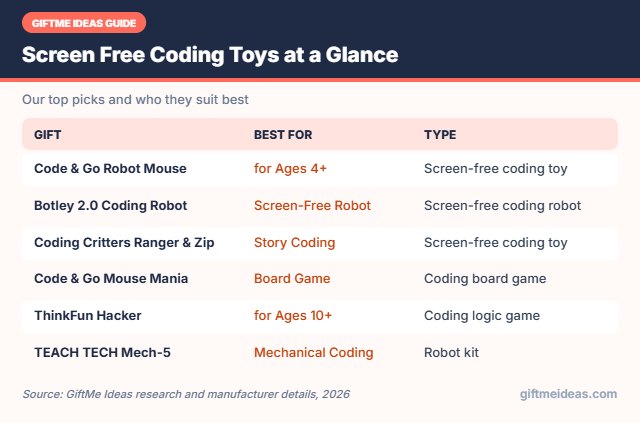
Best Screen Free Coding Toys Comparison Table
| Product | Best For | Type | Key Feature | Buy |
|---|---|---|---|---|
| Learning Resources Code & Go Robot Mouse Activity Set | Best for Ages 4+ | Screen-free coding toy | Program a mouse through mazes | Check Price |
| Learning Resources Botley 2.0 Coding Robot Activity Set | Best Screen-Free Robot | Screen-free coding robot | Multi-step coding with obstacles | Check Price |
| Learning Resources Coding Critters Ranger & Zip | Best Story Coding | Screen-free coding toy | Coding pet with storybook adventures | Check Price |
| Learning Resources Code & Go Mouse Mania Board Game | Best Board Game | Coding board game | Coding cards guide mice across a board | Check Price |
| ThinkFun Hacker Cybersecurity Coding Game | Best for Ages 10+ | Coding logic game | Cybersecurity-themed logic puzzles | Check Price |
| TEACH TECH Mech-5 Mechanical Coding Robot | Best Mechanical Coding | Robot kit | Mechanical coding robot with no electronics | Check Price |
| ThinkFun Gravity Maze Marble Logic Game | Best Logic Puzzle | STEM logic game | 60 challenges, marble run | Check Price |
| GiiKER Super Decoder Puzzle | Best Code-Breaker | Code-breaking puzzle | 600-level electronic code puzzle | Check Price |
The 8 Best Screen Free Coding Toys
Below are our picks for the best screen free coding toys, with who each one suits best and why it makes a thoughtful gift.

Learning Resources Code & Go Robot Mouse Activity Set
1The Code & Go Robot Mouse teaches early coding as kids program a mouse to reach the cheese through mazes.
👍 Pros & Cons
Pros
- No screens needed
- Perfect first coding toy
- Lots of maze challenges
Cons
- Too simple for older kids
- Batteries required
📄 Detailed Review
- Age: 4+
- Coding: Screen-free button sequencing
- Includes: Robot mouse, maze grids, walls, tunnels, cards
- Skills: Sequencing and problem solving
Kids press arrow buttons to plan a path, then watch the mouse follow it, learning sequencing and problem solving without screens. Activity cards add challenges.
It is ideal for 5 and 6 year olds.

Learning Resources Botley 2.0 Coding Robot Activity Set
2Botley 2.0 is a screen-free coding robot that kids program with a simple remote and coding cards.
👍 Pros & Cons
Pros
- Grows with skills
- No tablet needed
- Engaging challenges
Cons
- Remote programming has limits
- Batteries required
📄 Detailed Review
- Age: 5+
- Coding: Remote programmer, screen-free
- Features: 45° turns, loops, obstacle detection
- Includes: Coding cards and obstacle pieces
As skills grow, kids add multi-step paths, 45-degree turns and obstacle detection. It is a great bridge between toddler coding toys and app-based robots.
It is a smart educational gift for 6 and 7 year olds.

Learning Resources Coding Critters Ranger & Zip
3Coding Critters Ranger & Zip teaches early coding through storybook adventures.
👍 Pros & Cons
Pros
- Screen-free
- Story-based
- Cute pets
Cons
- Simple coding
- Batteries needed
📄 Detailed Review
- Ages: 4+
- Pieces: 22
- Coding: Button sequencing
- Screen: None
Kids press buttons to program Ranger the dog to move.
It is screen-free coding for preschoolers.

Learning Resources Code & Go Mouse Mania Board Game
4Code & Go Mouse Mania is a board game where players use coding cards to move mice.
👍 Pros & Cons
Pros
- Teaches coding logic
- Family game
- Screen-free
Cons
- Limited stock
- Simple for older kids
📄 Detailed Review
- Ages: 5+
- Players: 2–4
- Skill: Sequencing
- Screen: None
It teaches sequencing through family play.
It is a great coding game for young kids.

ThinkFun Hacker Cybersecurity Coding Game
5ThinkFun Hacker teaches coding logic through cybersecurity puzzles.
👍 Pros & Cons
Pros
- Teaches coding logic
- Screen-free
- Great for tweens
Cons
- Hard for young kids
- Single-player
📄 Detailed Review
- Brand: ThinkFun
- Ages: 10+
- Challenges: Beginner to expert
- Screen: None
Kids plan moves to protect data from hackers.
It is a smart screen-free game for ages 10 and up.
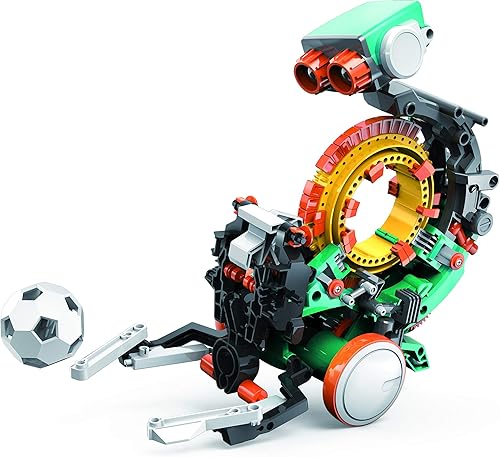
TEACH TECH Mech-5 Mechanical Coding Robot
6The TEACH TECH Mech-5 is programmed with mechanical pins instead of software.
👍 Pros & Cons
Pros
- Teaches coding mechanically
- No batteries
- Unique concept
Cons
- Fiddly build
- Limited actions
📄 Detailed Review
- Ages: 10+
- Coding: Punch-pin mechanical
- Actions: Throw, lift, kick, draw
- Power: None
Kids build it and code it to throw, lift, kick and draw.
It is a clever robot kit for ages 10 and up.

ThinkFun Gravity Maze Marble Logic Game
7ThinkFun Gravity Maze combines a marble run with logic puzzles: build a path so the marble reaches the target.
👍 Pros & Cons
Pros
- Award-winning STEM puzzle
- Solo or together
- Builds planning skills
Cons
- Some challenges are tough
📄 Detailed Review
- Type: Marble logic puzzle
- Ages: 8+
Challenges get harder, so it grows with your child.
A classic STEM gift for ages 8 and up.

8The GiiKER Super Decoder challenges kids to crack color codes across 600 levels.
👍 Pros & Cons
Pros
- Lots of levels
- Portable
- Screen-free logic
Cons
- Needs charging
- Can be frustrating
📄 Detailed Review
- Levels: 600
- Ages: 5+
- Type: Electronic
- Skill: Deduction
It builds logical thinking without a screen.
It is a great travel brain game.
How We Chose the Best Screen Free Coding Toys
To choose the best screen free coding toys, we chose coding toys that need no phone, tablet or computer to play.
We also follow the U.S. Consumer Product Safety Commission’s advice to respect age labels, add helmets for riding toys and keep small parts away from children under 3. See the CPSC toy safety tips.
Product details in this guide come from manufacturer specifications, age grading and verified owner feedback. Read more on our How We Test page.
How to Choose the Best Screen Free Coding Toys
Use these pointers to narrow down the best screen free coding toys for the family you are shopping for.
Mix Screens With Screen-Free Play
Many of the best gifts are open-ended: blocks, magnetic tiles, art kits, pretend play and outdoor toys. They can be played a hundred different ways and grow with your child. Electronic toys are fun, but balance them with toys that make kids build, imagine and move.
What Kids Learn From Coding Toys
Coding toys teach sequencing, loops, logic and debugging. Kids also learn patience, because fixing a program that doesn’t work is part of the fun.
Matching Coding Toys to Age
Ages 3–5: screen-free robots with buttons and cards. Ages 6–8: robots with simple block apps. Ages 9–12: kits that grow from Scratch to Python, Arduino or LEGO robotics.
What Kids Learn From Coding Toys
Coding toys teach sequencing, loops, logic and debugging. Kids also learn patience, because fixing a program that doesn’t work is part of the fun.
Before You Buy a Robot
Check whether it needs a phone, tablet or computer, what batteries it uses and whether the app is free. Kits that kids build themselves teach more than ready-made robots.
Screen-Free Coding Tips
A few simple ideas make the best screen free coding toys feel even more personal:
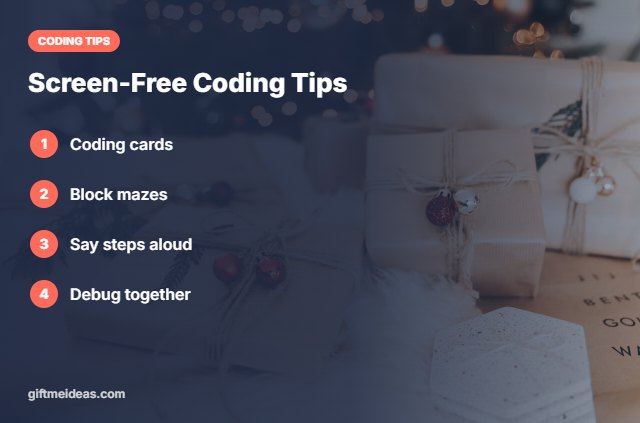
- Use coding cards to plan.
- Build mazes with blocks.
- Say each step aloud.
- Debug together.
- Increase difficulty slowly.
Still have questions about the best screen free coding toys? Here are quick answers.
Frequently Asked Questions
What are the best screen free coding toys?
Our top best screen free coding toys are the Learning Resources Code & Go Robot Mouse Activity Set, Learning Resources Botley 2.0 Coding Robot Activity Set, Learning Resources Coding Critters Ranger & Zip and the Learning Resources Code & Go Mouse Mania Board Game.
What are screen free coding toys?
Toys like Botley and Code & Go that use buttons and cards.
Do screen free toys teach real coding?
Yes. They teach sequencing, loops and debugging.
What screen free coding toy suits tweens?
ThinkFun Hacker or Mech-5.
Final Verdict
Our final pick for the best screen free coding toys is the Code & Go Robot Mouse. Choose the Botley 2.0 Coding Robot if you want a robot mouse, or the Coding Critters Ranger & Zip if they are tweens.
Related Gift Guides
Want more ideas beyond the best screen free coding toys? Explore these related gift guides:
- Best Coding Games for Kids
- Best Coding Kits for Beginners
- Best Coding Robot for 6 Year Olds
- Best Coding Robot for Kids
- Best STEM Gifts for 8 Year Olds
Product details are based on manufacturer information at the time of writing. Prices and availability change often, so check Amazon for the latest price.








Write Your Review
No reviews yet. Be the first to share your experience!