

GiftMe Ideas is reader-supported. As an Amazon Associate we earn from qualifying purchases, at no extra cost to you. Learn more.
GiftMe Ideas is reader-supported. As an Amazon Associate we earn from qualifying purchases. This never changes our recommendations. Learn more.
The best coding robot for kids depends on age: button-coded robots for preschoolers, app robots for early grades and Python-ready robots for tweens.
We picked the best robot for each stage.
Quick Answer: The Best Coding Robot for Kids
- Best for Ages 4–6: Learning Resources Code & Go Robot Mouse Activity Set
- Best Screen-Free: Learning Resources Botley 2.0 Coding Robot Activity Set
- Best for Ages 6–9: Wonder Workshop Dash Coding Robot
- Best for Ages 8+: Sphero BOLT Coding Robot
- Best Python Robot: Makeblock mBot2 Coding Robot
- Best All-Rounder: Makeblock Codey Rocky
- Best for Teens: ELEGOO Smart Robot Car Kit V4
- Best Budget App Robot: Sphero Mini Coding Robot
The Dash robot and Sphero BOLT are our top best coding robot for kids picks. Code & Go is great for preschoolers.
Best Coding Robot for Kids Comparison Table
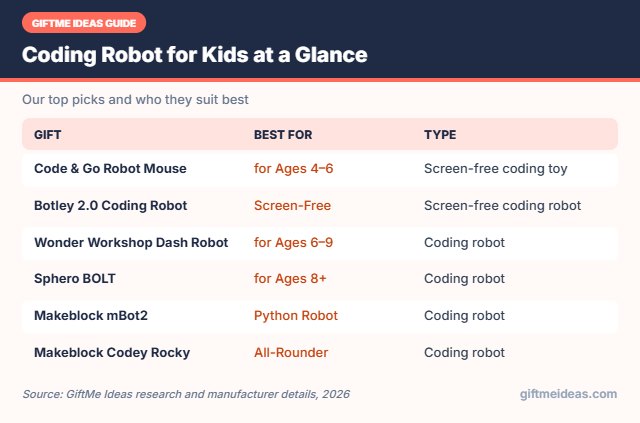
| Product | Best For | Type | Key Feature | Buy |
|---|---|---|---|---|
| Learning Resources Code & Go Robot Mouse Activity Set | Best for Ages 4–6 | Screen-free coding toy | Program a mouse through mazes | Check Price |
| Learning Resources Botley 2.0 Coding Robot Activity Set | Best Screen-Free | Screen-free coding robot | Multi-step coding with obstacles | Check Price |
| Wonder Workshop Dash Coding Robot | Best for Ages 6–9 | Coding robot | Programmable robot for ages 6–11 | Check Price |
| Sphero BOLT Coding Robot | Best for Ages 8+ | Coding robot | Robot ball with LED matrix and sensors | Check Price |
| Makeblock mBot2 Coding Robot | Best Python Robot | Coding robot | Scratch and Python robot with sensors and screen | Check Price |
| Makeblock Codey Rocky | Best All-Rounder | Coding robot | Panda robot with Scratch and Python | Check Price |
| ELEGOO Smart Robot Car Kit V4 | Best for Teens | Robot kit | Programmable robot car with camera | Check Price |
| Sphero Mini Coding Robot | Best Budget App Robot | Coding robot | Ping-pong-ball-sized programmable robot | Check Price |
The 8 Best Coding Robot for Kids
Below are our picks for the best coding robot for kids, with who each one suits best and why it makes a thoughtful gift.

Learning Resources Code & Go Robot Mouse Activity Set
1The Code & Go Robot Mouse teaches early coding as kids program a mouse to reach the cheese through mazes.
👍 Pros & Cons
Pros
- No screens needed
- Perfect first coding toy
- Lots of maze challenges
Cons
- Too simple for older kids
- Batteries required
📄 Detailed Review
- Age: 4+
- Coding: Screen-free button sequencing
- Includes: Robot mouse, maze grids, walls, tunnels, cards
- Skills: Sequencing and problem solving
Kids press arrow buttons to plan a path, then watch the mouse follow it, learning sequencing and problem solving without screens. Activity cards add challenges.
It is ideal for 5 and 6 year olds.

Learning Resources Botley 2.0 Coding Robot Activity Set
2Botley 2.0 is a screen-free coding robot that kids program with a simple remote and coding cards.
👍 Pros & Cons
Pros
- Grows with skills
- No tablet needed
- Engaging challenges
Cons
- Remote programming has limits
- Batteries required
📄 Detailed Review
- Age: 5+
- Coding: Remote programmer, screen-free
- Features: 45° turns, loops, obstacle detection
- Includes: Coding cards and obstacle pieces
As skills grow, kids add multi-step paths, 45-degree turns and obstacle detection. It is a great bridge between toddler coding toys and app-based robots.
It is a smart educational gift for 6 and 7 year olds.

3Dash is a programmable robot for kids 6 to 11 that sings, dances, navigates obstacles and responds to voice.
👍 Pros & Cons
Pros
- Kids code a real robot
- Grows from simple to advanced
- Used in many classrooms
Cons
- Requires a tablet
- Higher price
📄 Detailed Review
- Age: 6–11
- Abilities: Sings, dances, avoids obstacles, voice commands
- Apps: Blockly, Wonder, Path and more
- Platforms: iOS, Android, Fire OS
Kids code Dash through free apps that progress from simple drag-and-drop paths to Blockly programming. It turns screen time into creative problem solving.
It is a fantastic tech gift for curious kids.

4Sphero BOLT is a robot ball kids program with drawing, blocks or real text code.
👍 Pros & Cons
Pros
- Grows from blocks to text code
- Lots of sensors
- Durable shell
Cons
- Needs a tablet or computer
- Higher price
📄 Detailed Review
- Brand: Sphero
- Coding: Draw, Blocks, Python, JavaScript
- Features: LED matrix and sensors
- Age: 8+
Its LED matrix and sensors open up advanced projects.
It is a top coding gift for tweens.

5The Makeblock mBot2 is a buildable coding robot that grows from Scratch blocks to Python.
👍 Pros & Cons
Pros
- Grows to Python
- Powerful sensors
- Classroom favorite
Cons
- Higher price
- Needs a computer or tablet
📄 Detailed Review
- Coding: Scratch and Python
- Features: Sensors, color screen, AI features
- Build: Step-by-step
- Best for: Ages 8+
It has sensors, a color screen and AI features for advanced projects.
It suits kids ready for real coding.

6Makeblock Codey Rocky is a panda-shaped coding robot with sensors and an LED screen.
👍 Pros & Cons
Pros
- Ready out of the box
- Grows to Python
- Lots of sensors
Cons
- Higher price
- Needs a device
📄 Detailed Review
- Ages: 6–12
- Coding: Scratch and Python
- Features: Sensors, LED screen, AI
- Brand: Makeblock
Kids code it with Scratch blocks or Python.
It suits ages 6 to 12.

7The ELEGOO Smart Robot Car Kit V4 lets kids build and code a robot car with a camera.
👍 Pros & Cons
Pros
- Builds a real robot
- Many modes to explore
- Teaches coding
Cons
- Longer build
- Needs adult help at first
📄 Detailed Review
- Board: UNO R3 compatible
- Features: FPV camera, line tracking, obstacle avoidance
- Control: App or IR remote
- Build: Keyed connectors
It supports line tracking, obstacle avoidance and app control.
It is a big STEM project for older tweens.

8Sphero Mini is a tiny programmable robot the size of a ping pong ball.
👍 Pros & Cons
Pros
- Small and affordable
- Easy to start coding
- Fun games
Cons
- Needs a phone or tablet
- Small battery
📄 Detailed Review
- Brand: Sphero
- Size: Ping pong ball
- Apps: Sphero Edu and Sphero Play
- Use: Coding and games
Kids drive it, play games and learn to code with free apps.
It is an easy first coding robot.
How We Chose the Best Coding Robot for Kids
To choose the best coding robot for kids, we chose coding robots for each age group, from screen-free to Python-ready.
We also follow the U.S. Consumer Product Safety Commission’s advice to respect age labels, add helmets for riding toys and keep small parts away from children under 3. See the CPSC toy safety tips.
Product details in this guide come from manufacturer specifications, age grading and verified owner feedback. Read more on our How We Test page.
How to Choose the Best Coding Robot for Kids
Use these pointers to narrow down the best coding robot for kids for the family you are shopping for.
Matching Coding Toys to Age
Ages 3–5: screen-free robots with buttons and cards. Ages 6–8: robots with simple block apps. Ages 9–12: kits that grow from Scratch to Python, Arduino or LEGO robotics.
What Kids Learn From Coding Toys
Coding toys teach sequencing, loops, logic and debugging. Kids also learn patience, because fixing a program that doesn’t work is part of the fun.
Matching Coding Toys to Age
Ages 3–5: screen-free robots with buttons and cards. Ages 6–8: robots with simple block apps. Ages 9–12: kits that grow from Scratch to Python, Arduino or LEGO robotics.
What Kids Learn From Coding Toys
Coding toys teach sequencing, loops, logic and debugging. Kids also learn patience, because fixing a program that doesn’t work is part of the fun.
Before You Buy a Robot
Check whether it needs a phone, tablet or computer, what batteries it uses and whether the app is free. Kits that kids build themselves teach more than ready-made robots.
Choosing a Coding Robot
A few simple ideas make the best coding robot for kids feel even more personal:
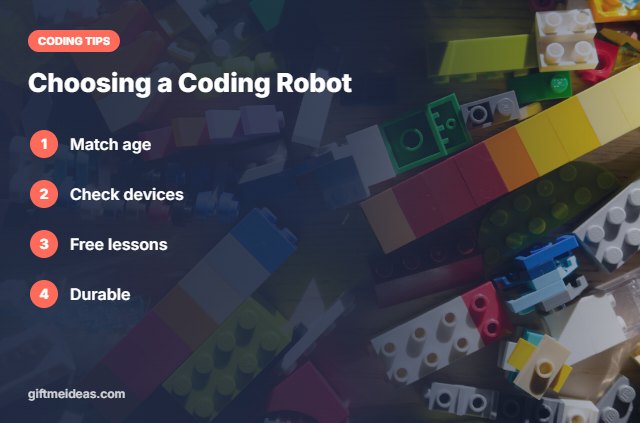
- Match it to age and reading level.
- Check device needs.
- Look for free apps and lessons.
- Pick durable designs.
- Plan coding challenges together.
Still have questions about the best coding robot for kids? Here are quick answers.
Frequently Asked Questions
What are the best coding robot for kids?
Our top best coding robot for kids are the Learning Resources Code & Go Robot Mouse Activity Set, Learning Resources Botley 2.0 Coding Robot Activity Set, Wonder Workshop Dash Coding Robot and the Sphero BOLT Coding Robot.
What is the best coding robot for kids?
Dash for ages 6–9 and Sphero BOLT for ages 8+.
What robot teaches Python?
Makeblock mBot2 and Sphero BOLT.
What is a screen-free coding robot?
Botley 2.0 or Code & Go.
Final Verdict
Our final pick for the best coding robot for kids is the Code & Go Robot Mouse. Choose the Botley 2.0 Coding Robot if you want Sphero BOLT, or the Wonder Workshop Dash Robot if they are preschoolers.
Related Gift Guides
Want more ideas beyond the best coding robot for kids? Explore these related gift guides:
- Best Coding Toys for 10 Year Olds
- Best Coding Toys for 3 Year Olds
- Best Coding Toys for 5 Year Olds
- Best Coding Toys for 8 Year Olds
- Best STEM Gifts for 8 Year Olds
Product details are based on manufacturer information at the time of writing. Prices and availability change often, so check Amazon for the latest price.

Write Your Review
No reviews yet. Be the first to share your experience!